The address is known: 10.12.8.201 is answering pings and it should not be — nothing in the register claims it. The next question is always physical: which closet, which switch, which port? An IP spreadsheet cannot answer that, and neither can a pure ping scanner. ManageEngine OpUtils is built around joining those two views — the IP register and the switch-port map — so that “unknown address” becomes “unknown device on Gi1/0/17 in the second-floor stack”.
What OpUtils is
OpUtils is an on-premises web application from ManageEngine (the IT management division of Zoho). It bundles an IP address manager, a switch port mapper, rogue device detection, DHCP monitoring, and a collection of what the vendor calls “30+ network tools” (ping, traceroute, SNMP walkers, MAC lookups and the like) behind a single console.
It runs on either Windows or Linux. At the time of writing the vendor’s system requirements list Windows Server 2016 through 2025 for production (Windows 11 for evaluation) and a range of Linux distributions including Ubuntu 18 through 24 and later, RHEL 7+, CentOS Stream 9+, and Rocky 10+. It ships with a bundled PostgreSQL database, or can use Microsoft SQL Server 2016 through 2022 for larger or policy-driven installs. The recommended hardware is modest: a dual- or quad-core CPU, 4 GB of RAM, and more than 10 GB of disk.
How it reconciles the record with the network
OpUtils approaches the problem from both ends at once.
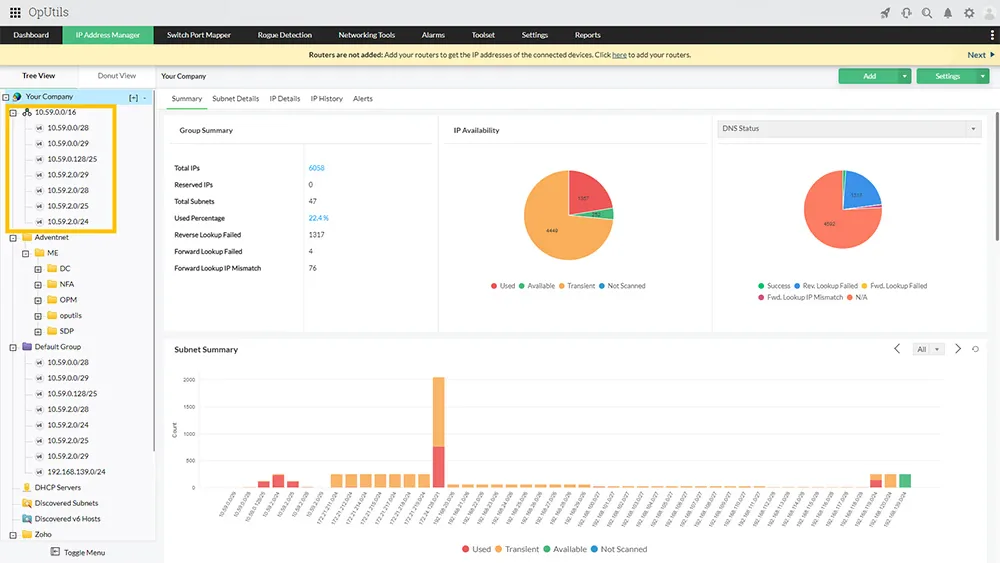
The IP side. You add subnets, and OpUtils scans them on a schedule using ICMP and SNMP. Each address gets a status — used, available, transient, reserved — plus DNS name, MAC, and last-seen data. IPv4 and IPv6 are both supported. Addresses that change state between scans are flagged, and history is kept so you can see when a supposedly free address last answered.
The switch side. The switch port mapper polls managed switches over SNMP (UDP 161, read community or SNMPv3 credentials), reads MAC forwarding tables and interface data, and correlates them with ARP data from routers or layer-3 switches. The result is a table of port → MAC → IP → hostname, with VLAN membership.
The link between them. Once both are populated, clicking an address shows its switch port, and clicking a port shows what addresses have appeared on it. Rogue detection builds on the same data: you mark known devices as trusted, and anything new appearing on the network is flagged, with the option to shut the switch port via SNMP write access if you choose to grant it.
DHCP. The vendor describes monitoring for multi-vendor DHCP environments with alerts that warn before scopes are exhausted. The higher Management edition adds what ManageEngine calls “Full DDI management”, meaning DHCP and DNS administration from the console rather than only monitoring.
Where it’s strong
- Physical location of addresses. The switch port correlation is the standout. For campus and office networks with lots of access switches, it removes a lot of manual MAC-table tracing.
- Windows or Linux host. Unlike Windows-only competitors, you can run it on a Linux VM with the bundled database.
- Low entry point. A free edition exists for a single class C subnet and one switch — enough to evaluate the workflow on a real segment of your own network.
- Toolbox included. Admins who currently keep a folder of small utilities get many of them in the same console.
Where it falls short / who should skip it
OpUtils depends heavily on SNMP. If your switches are unmanaged, or your network team will not grant SNMP read access from the OpUtils server, the switch-port half — the main reason to choose it — is gone. SNMPv3 is supported and worth using, but it takes planning.
The web interface is dense and not especially quick to learn; it carries the typical ManageEngine layout with many menus and settings pages.
It is not a design or data-centre modelling tool. Rack elevations, cabling, and interface-level intent are better held in NetBox. And for a team whose problem is primarily DNS/DHCP orchestration across many servers, a dedicated overlay such as Micetro goes further.
Licensing is sized by both IPs and switch ports, which makes estimates slightly less intuitive than a single count; campus networks with many ports can climb tiers faster than expected.
Who it suits
Office and campus environments with managed switches where the recurring question is “where is this device plugged in?”. Small IT teams that want one console for address scanning, port mapping, and rogue alerts, and that can run either a Windows or Linux VM.
Licensing and cost
At the time of writing OpUtils is offered in three editions: Free (one class C subnet and switch, basic scanning and tools), Professional (IP address management, switch port mapping, rogue detection, network tools), and Management (adds full DDI management). Paid editions start from a scope of 250 IPs and switch ports and are sold as either subscription or perpetual licences, with a 30-day trial. ManageEngine’s pages show different figures depending on edition and billing period, so check the vendor’s current pricing page or request a quote rather than relying on a number from us. The vendor also mentions a discount when OpUtils is added to an existing OpManager install.
How it compares
The natural head-to-head is with SolarWinds, covered in SolarWinds IPAM vs ManageEngine OpUtils. SolarWinds goes deeper on DHCP/DNS across vendors; OpUtils is lighter, runs on Linux, and adds switch-port mapping. For a quick check of free addresses before assigning a static, our guide on finding free IP addresses in a subnet works with or without OpUtils. See also the address discovery category.
Getting it safely
Get OpUtils from manageengine.com via the OpUtils product page. On Windows, check the file’s digital signature (Properties → Digital Signatures) and confirm it names the vendor’s company before running it, and on Linux fetch the package only from the vendor site. Our where to get software page explains our vendor-only linking policy. Scan and map only networks you own or are authorized to manage.
FAQ
Is ManageEngine OpUtils free?
There is a free edition limited to one class C subnet and one switch. Larger networks need the Professional or Management edition.
Does OpUtils need SNMP?
For switch port mapping and much of the discovery, yes. Plain ping-based subnet scanning works without it, but you lose the port correlation.
Can it run on Linux?
Yes. The vendor lists several Linux distributions for production, alongside Windows Server.
Can it block rogue devices?
It can flag them, and, if you give it SNMP write access to switches, it can disable the port a device is connected to. Many teams keep that manual.