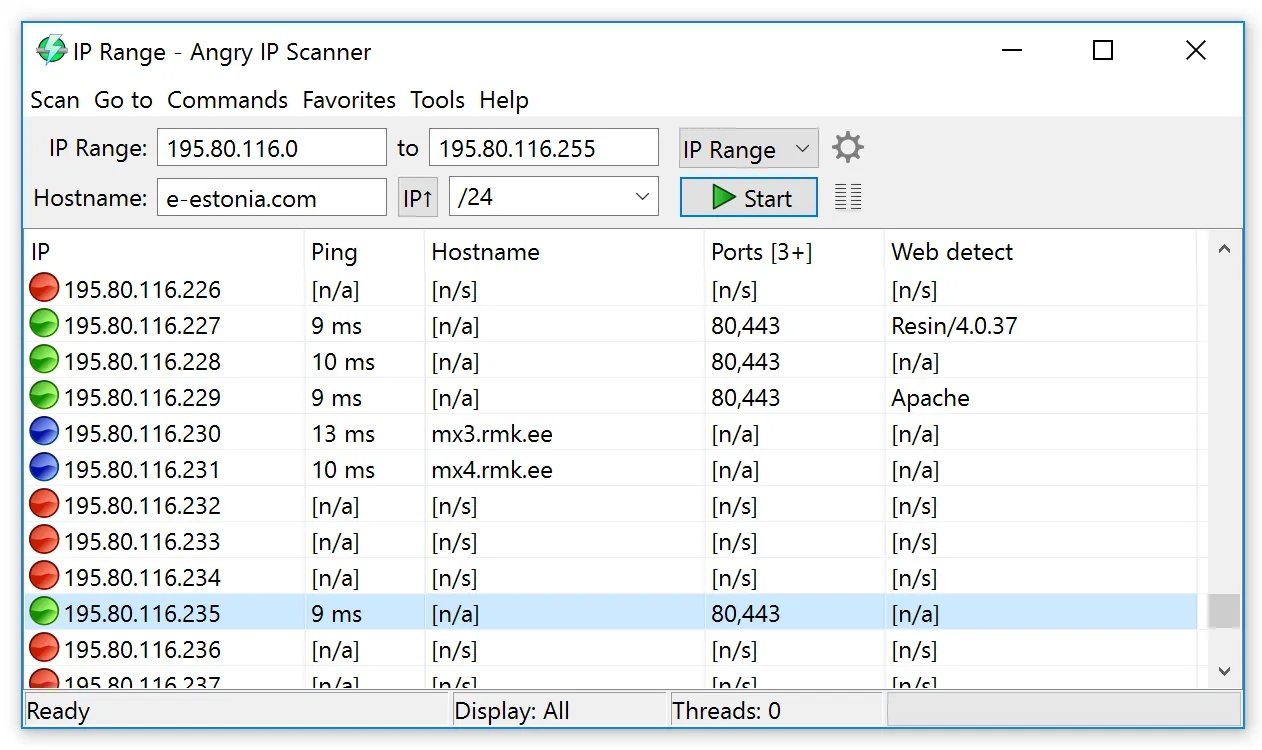
The register says 192.168.50.60 through .79 are unallocated, and a new batch of IP cameras needs statics. Before you type any of them into a camera’s web UI, it is worth thirty seconds to ask the network directly whether anything already answers in that block. Angry IP Scanner is the tool many admins reach for at this moment: open it, paste the range, hit Start, and see which “free” addresses are not free at all.
What it is
Angry IP Scanner (the project also goes by ipscan) is an open-source network scanner written in Java with the SWT toolkit, released under the GPL v2 and maintained by Anton Keks. It runs on Windows, macOS, and Linux; the project says installation is not required. The current release at the time of writing is 3.10.0 (August 2026), which raised the minimum Java version to 21 — Windows and macOS builds bundle a Java runtime, while the Linux .deb and .rpm packages expect one on the system.
It is not an IPAM. It stores no plan and keeps no history between runs unless you save the results. Its job in a reconciliation workflow is the “what actually answers” half: it produces a snapshot you can compare against phpIPAM, NetBox, or a spreadsheet.
How it works
Angry IP Scanner walks a list of addresses — an IP range, a random sample, or a file of addresses in almost any text format — and for each one runs a configurable set of fetchers:
- Ping (round-trip time) and TTL;
- Hostname via reverse DNS;
- MAC address via ARP (only meaningful on the local layer-2 segment);
- NetBIOS info — computer name, workgroup, and logged-on user where Windows hosts answer;
- Ports (open TCP ports from a list you define) and filtered ports;
- Version detection, which tries to identify the service behind an open port.
How it decides a host is alive is also configurable. The documentation lists ICMP echo, the Windows ICMP.DLL method, UDP probing, and TCP connection attempts (to port 80 by default). This matters: a Windows 11 laptop on a public firewall profile drops ICMP, so a pure-ping sweep calls it dead. Switching to a TCP or UDP pinger, and adding a few commonly open ports such as 445 or 3389 to the port list, reveals hosts that are quietly holding addresses.
Scans are multi-threaded, and the 3.10 release enables Java virtual threads by default, so a /24 sweep with ping and a small port list typically completes in seconds on a LAN. Results export to TXT, CSV (columns in fetcher order), XML, or an IP:Port list.
There is also a command-line mode for scheduled or scripted runs. A nightly CSV of a user VLAN, saved with a date stamp, gives you a crude but useful “last seen” history to diff against your register. Check ipscan --help on your build for the exact switches.
Where it’s strong
- Speed to answer. No server, no database, no account. From launch to result is under a minute.
- Cross-platform. The same tool on a Windows admin workstation, a Mac, or a Linux jump host.
- Flexible liveness checks. Combining ICMP, UDP, and TCP pingers finds hosts that ignore ping.
- Clean exports. CSV output drops straight into a spreadsheet diff or a script that compares against an IPAM API.
- Free and open source. GPL v2, no nag screens, no licence for commercial use.
Where it falls short / who should skip it
It remembers nothing. There is no concept of “this address was seen last Tuesday” unless you build it from saved exports, so it cannot replace an IPAM for ongoing reconciliation.
MAC addresses only come back for hosts on your own broadcast domain; scanning across a router returns the router’s view, not the host’s MAC. For MAC-to-port correlation across switches you need SNMP-based tools such as ManageEngine OpUtils.
Releases are irregular — 3.10.0 (August 2026) followed 3.9.3 (November 2025) after a quieter 2023–2024 — and the Java dependency occasionally causes friction on Linux hosts with older runtimes. Some endpoint security products also flag active port scanners by behaviour, so tell your security team before scanning, and expect alerts if you do not.
It offers no share-level Windows detail. If what you want is to list SMB shares and check access rights across a Windows network, LizardSystems Network Scanner is built for that.
Who it suits
Every admin who assigns statics and wants a sanity check before doing so; MSP technicians who need a portable scanner across mixed OS workstations; and anyone building a lightweight “what answers” snapshot to feed a register. Use it only on networks you own or are authorized to scan.
Licensing and cost
Free and open source under the GNU GPL v2. There is no paid edition.
How it compares
The closest comparison on this site is Angry IP Scanner vs LizardSystems Network Scanner: Angry IP is cross-platform and port-oriented; the LizardSystems tool is Windows-only and focused on shares and access rights. For the complete workflow of checking a block before assigning a static, see our guide on finding genuinely free addresses in a subnet. Other scanners are listed in the address discovery category.
Getting it safely
Get Angry IP Scanner from angryip.org or the project’s GitHub releases page — nowhere else. Because the tool is popular, look-alike sites exist; check that the domain is exactly the project’s. The release page does not publish SHA-256 hashes at the time of writing, so compare the file name and size with the GitHub release asset and, on Windows, check the file’s signature status before running. Our where to get software page covers this in more detail.
FAQ
Is Angry IP Scanner safe to run on a corporate network?
The software itself is open source and widely used. Scan only networks you own or are authorized to scan, and notify your security team, since active scans can trigger IDS or endpoint alerts.
Why does it show a host as dead when I know it is on?
The host probably drops ICMP. Change the pinging method to include TCP or UDP probes, or add a commonly open port to the port list.
Does it need Java installed?
Windows and macOS builds bundle Java. On Linux, install a Java 21 or newer runtime.
Can it scan IPv6?
It is designed around IPv4 ranges; full IPv6 subnets are too large to sweep in any case. Maintain IPv6 records in your IPAM instead.