Consider a company that grew by acquisition: Microsoft DNS and DHCP on domain controllers at headquarters, BIND on a pair of Linux boxes the old web team built, Kea at two newer branches, and Route 53 plus Azure DNS for cloud workloads. Each has its own console, its own admins, and its own idea of which addresses are taken. Replacing all of that with a single appliance vendor is a large, risky project. Micetro takes the opposite route: leave the servers where they are and put one management layer over the top.
What Micetro is
Micetro is a DDI (DNS, DHCP, and IP address management) product now sold by BlueCat Networks; it was developed by Men & Mice, and the documentation still lives on docs.menandmice.com. BlueCat describes it as an API-driven overlay that orchestrates existing DNS and DHCP services rather than replacing them. At the time of writing the documentation’s current line is 25.1, following calendar-style versioning.
Supported services named on the vendor’s page include Microsoft DNS and DHCP, BIND, ISC Kea, Cisco Meraki, AWS Route 53, and Azure DNS. Micetro can also manage BlueCat’s own DNS/DHCP appliances, which matters for shops that run both.
Architecture in practice
Micetro has four moving parts:
- Micetro Central, the orchestration server, listening on TCP 1231. It can run on a VM, bare metal, or in the cloud.
- Data storage — an embedded SQLite database by default for smaller installs, with Microsoft SQL Server or PostgreSQL recommended for larger ones (Azure deployments use Azure SQL).
- Agents: a DNS agent listening on TCP 1337 and a DHCP agent on TCP 4151. Agents can sit on the DNS/DHCP servers themselves or, for Microsoft servers, run “agent-free” from a proxy host in the same domain using a service account with DNS and DHCP admin rights.
- The Web Application, the browser UI, plus a REST API. The vendor states that anything you can do in the UI can be done through the API.
A typical firewall plan, then: Central reachable from the web tier and from admins; Central able to reach each agent on 1337/4151; agents able to reach the services they manage locally. For a branch DHCP server behind a slow WAN link, the documentation suggests placing a DHCP agent in the same local network as that server.
How it reconciles plan and reality
Because Micetro sits directly on the DNS and DHCP servers, its IPAM data is fed by the systems that actually allocate addresses — not only by a scanner’s opinion of what answered ping. In practice that gives you:
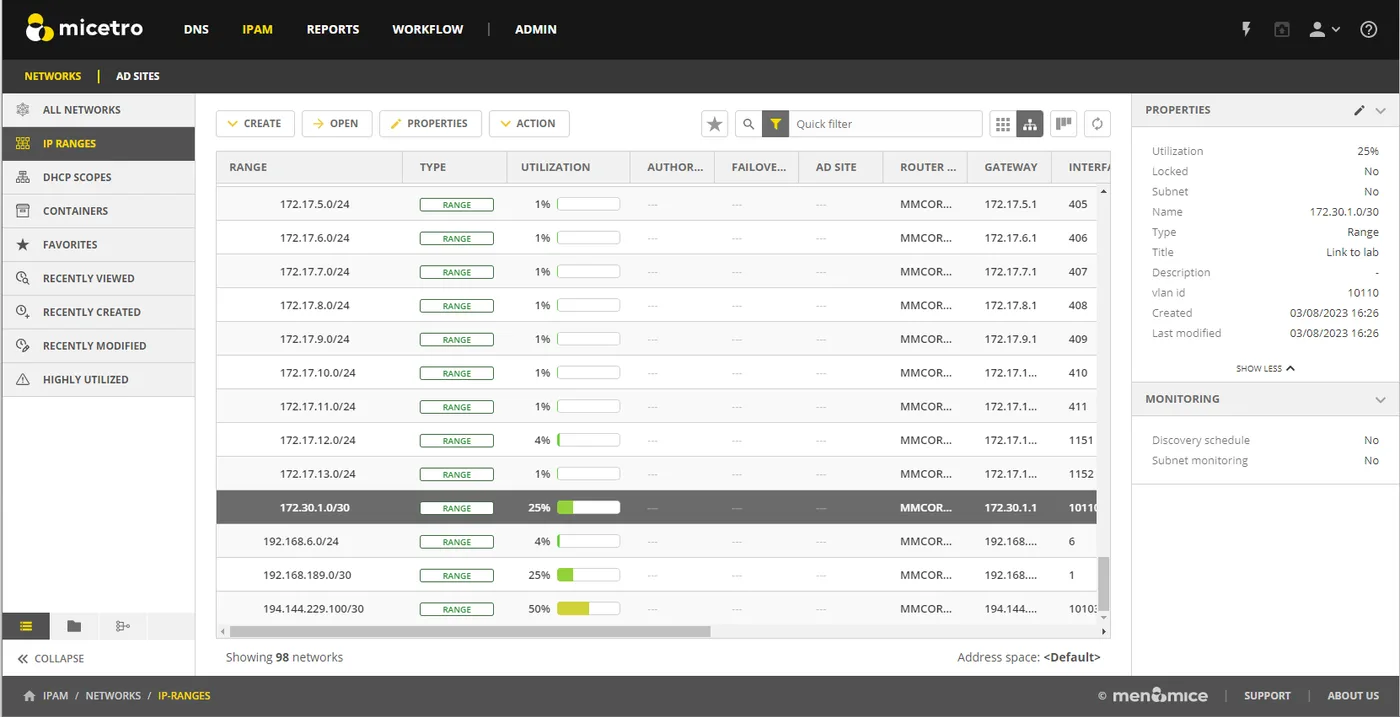
- Scopes and leases in the IPAM view. Utilisation per scope and range, with the ability to create reservations and scopes from the Micetro console against whichever DHCP server holds them.
- DNS records attached to addresses. A/AAAA and PTR records are managed alongside the IP entries, so the “address is free but a DNS record still points at it” mismatch is visible.
- Address spaces. Separate, overlapping address spaces (think acquired companies both using 10.0.0.0/16, or customer environments) can be administered without collisions.
- Discovery and ping data for ranges, to catch hosts that hold addresses outside DHCP.
Role-based access control is granular — the vendor cites deployments with tens of thousands of users — and integrates with Active Directory, Azure AD, Okta, and LDAP, so you can delegate a single range or zone to a regional team.
Where it’s strong
- No forklift. Existing Microsoft, BIND, and Kea servers keep running; you add management, not a migration.
- Multi-vendor and hybrid. On-prem and cloud DNS in one console is hard to find elsewhere at this depth.
- Automation. A complete REST API with Swagger documentation makes it usable from provisioning pipelines, and BlueCat lists integrations with Cisco ACI, Cisco DNA Center, and VMware NSX.
- Delegation. Fine-grained RBAC suits organisations where DNS and DHCP are touched by several teams.
Where it falls short / who should skip it
It is enterprise DDI software, priced and sold accordingly: there are no public prices, and buying involves a quote and a sales conversation. For a single office with one Windows DHCP server, it is far more than you need.
The value depends on having DNS and DHCP worth orchestrating. If your pain is mainly undocumented statics on flat networks, a scanner-backed IPAM like phpIPAM or ManageEngine OpUtils gets you further per hour spent.
It is not a physical-infrastructure model: there is no rack, cable, or switch-port layer comparable to NetBox or OpUtils’ port mapper.
And an overlay is one more critical system. Central becomes a dependency for changes (though not for resolution or lease handling, which stay on the underlying servers), so plan its database backups and high availability.
Who it suits
Mid-size and large organisations with mixed or hybrid DNS/DHCP, several admin teams, and a desire to automate address and record changes through an API. It is also a sensible fit for organisations consolidating after mergers, where overlapping address spaces are common.
Licensing and cost
Commercial. At the time of writing BlueCat does not publish list prices for Micetro; it offers a free trial and a quote process. Check the vendor’s current product and pricing pages for licensing terms, and ask during the quote how the licence scales with the number of managed DNS/DHCP servers, zones, and addresses, since that drives the long-term cost.
How it compares
Against SolarWinds IPAM, Micetro is more DNS-centric and cloud-aware, while SolarWinds is attractive if you already run its monitoring platform. Against free tools, Micetro trades cost for native DHCP/DNS control. For the underlying policy decision about which devices should get reservations versus statics, see DHCP reservations vs static IPs. The full list is in the IPAM software category.
Getting it safely
Obtain Micetro through BlueCat’s Micetro product page and trial request, or your BlueCat customer portal. Verify that Windows components are signed by the vendor and follow the version-matched installation steps in the Micetro documentation. See where to get software for how we link to vendors.
FAQ
Is Micetro the same as Men & Mice Suite?
Micetro is the current name of the Men & Mice DDI product, now part of BlueCat. Older documentation and service names still use “Men&Mice”.
Do I need agents on every DNS and DHCP server?
No. Microsoft servers can be managed agent-free through a proxy agent in the same domain; BIND and Kea typically use a local agent.
Which ports need to be open?
Central listens on TCP 1231, the DNS agent on TCP 1337, and the DHCP agent on TCP 4151.
Does Micetro replace my DHCP servers?
No. Leases and resolution stay on your existing servers; Micetro manages their configuration and reads their data.